Policy Line Item Accounting
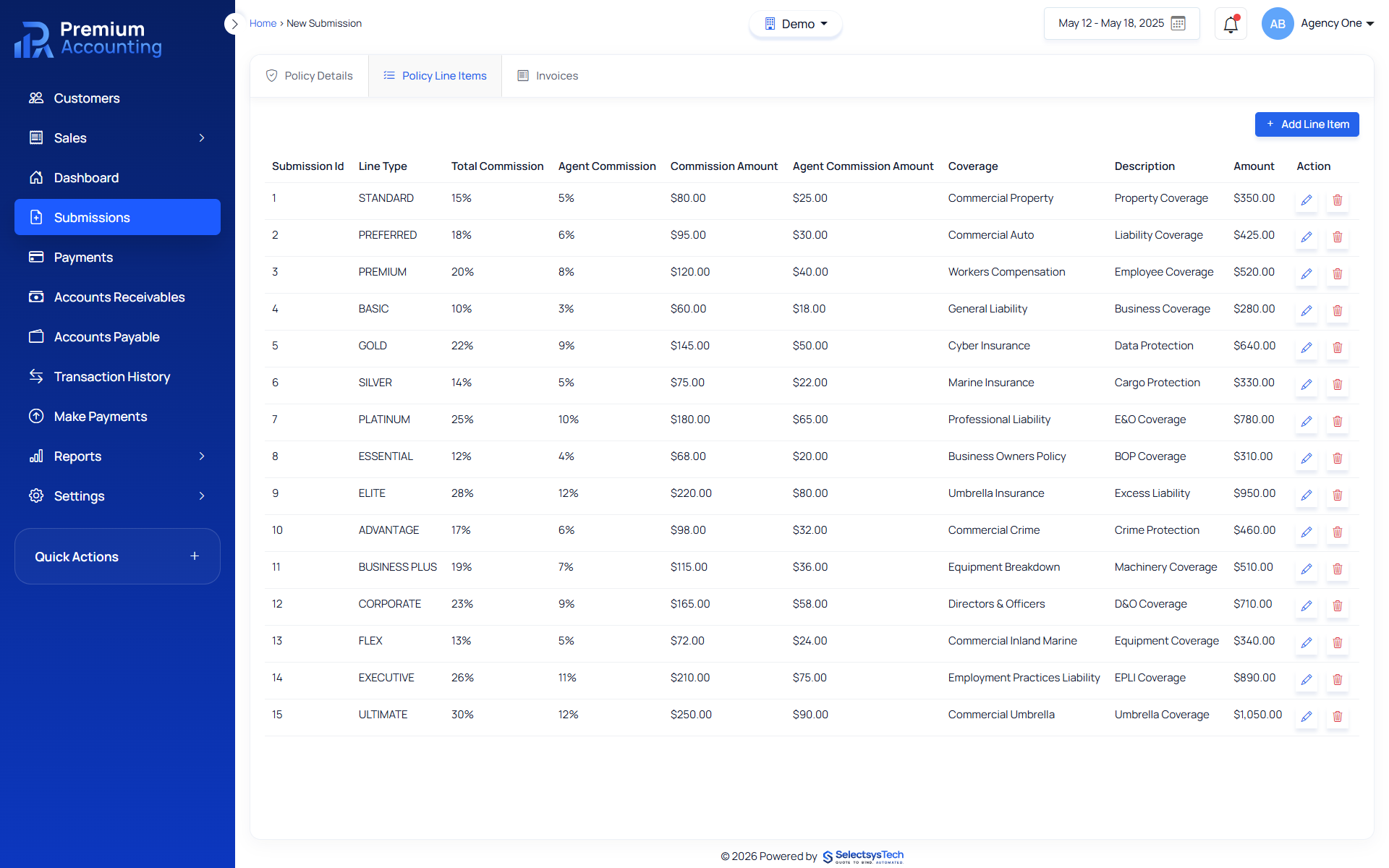
Every insurance policy is made up of individual financial components. Premiums, taxes, fees and commissions must all be accurately captured before invoices can be generated and accounting transactions posted. RemoteBooksOnline helps insurance organizations implement structured policy line item accounting using Premium Accounting. Instead of managing financial components in spreadsheets or disconnected systems, accounting teams work from a centralized workflow where every premium, fee and tax becomes part of the policy accounting record. Premium Accounting supports policy line item accounting while integrating with QBO, Xero, Workday and Sage for financial reporting. Learn more about Enterprise Insurance Accounting Outsourcing.
What Is Policy Line Item Accounting?
Policy line item accounting is the process of recording every financial component associated with an insurance policy. Each line item contributes to the total financial value of the policy and determines how invoices, commissions and accounting transactions are created.
Typical policy line items include:
 Premium
- State Taxes
- Surplus Lines Taxes
- Policy Fees
- Inspection Fees
- Carrier Fees
- Other Charges
Every line item becomes part of the permanent accounting record. Learn more about Insurance Accounting, Insurance Premium Accounting
Why Policy Line Items Matter
Policy accounting does not stop with policy information. Each policy requires financial detail.
Without structured line item accounting, organizations often experience:
- Incorrect invoices
- Incorrect commissions
- Missing taxes
- Duplicate fees
- Reconciliation issues
- Reporting inconsistencies
- Manual spreadsheet calculations
Premium Accounting eliminates these problems by treating every financial component as an individual accounting record.
Inside Premium Accounting
After a policy submission is completed, users move directly to the Policy Line Items screen.
Accounting users can:
- Add Premium
- Add Taxes
- Add Fees
- Edit Existing Line Items
- Delete Line Items
- Review Policy Totals
Every change updates the policy accounting record before invoices are generated. Learn more about Policy Submission Accounting
Premium Line Items
Premium is the primary accounting line item for every insurance policy. When Premium is selected, Premium Accounting automatically displays additional accounting fields including:
- Agency Commission %
- Agency Commission Amount
- MGA Commission %
- MGA Commission Amount
- Total Commission %
- Total Commission Amount
These values are calculated automatically using the commission percentages configured during policy setup. This eliminates manual commission calculations while improving accounting consistency. Learn more about Commission Accounting
Tax and Fee Line Items
Taxes and fees require different accounting treatment than premium. Premium Accounting supports separate tax and fee line items including configurable accounting behavior.
Each tax or fee can include:
- Tax Type
- Fee Type
- Billing Type
- Accounting Direction
- Pass Through Entity
- Customer Billing Rules
Because taxes and fees are configured separately, accounting teams maintain greater control over invoice generation and financial reporting. Learn more about Insurance Line Item Mapping
Policy Line Item Workflow
Open Policy Line Items
Select Line Item Type
Examples:
- Premium
- Tax
- Fee
Enter Amount
Automatic Commission Calculation
If Premium is selected, Premium Accounting automatically calculates:
- Agency Commission
- MGA Commission
- Total Commission
Save Line Item
The line item appears in the Policy Line Item Grid.
Repeat as Needed
Additional premiums, taxes and fees can be added until the policy accounting record is complete.
Proceed to Invoice Generation
After reviewing policy totals, users continue to Invoice Management.
Policy Line Item Grid
Every saved line item appears in a centralized accounting grid.
Users can:
- View
- Edit
- Delete
- Review Totals
Changes automatically update policy totals before invoice generation. This gives accounting teams a complete view of every financial component associated with the policy.
Benefits of Structured Line Item Accounting
Organizations implementing Premium Accounting gain:
- Better accounting accuracy
- Automated commission calculations
- Consistent tax treatment
- Standardized fee handling
- Improved invoice accuracy
- Better audit trails
- Faster reconciliation
- Better reporting
- Improved financial controls
Relationship to Premium Accounting
Policy line items are the foundation of premium accounting. Every downstream accounting workflow depends on accurate line item data.
Line items drive:
- Premium Accounting
- Commission Accounting
- Invoice Generation
- Financial Reporting
- Reconciliation
- General Ledger Posting
Learn more about Insurance Premium Accounting, Insurance Financial Reporting, Premium Reconciliation
Relationship to General Ledger
After invoices are generated and accounting activity is reviewed, financial transactions can synchronize with:
Financial transactions can synchronize with:
Premium Accounting manages insurance specific accounting while the ERP manages corporate financial reporting. Learn more about Insurance General Ledger Integration
How RemoteBooksOnline Helps
RemoteBooksOnline helps insurance organizations:
- Configure premium line items
- Configure taxes
- Configure fees
- Configure commissions
- Configure accounting mappings
- Train accounting users
- Implement Premium Accounting
- Support ongoing accounting operations
Learn more about Insurance Accounting Implementation

Remote Books Online is an
for






Insurance Native
Financial Workflows

End-to-End
Implementation

Training & Ongoing
Support

Accurate, Compliant &
Audit-Ready
Frequently Asked Questions
A policy line item represents an individual financial component of an insurance policy such as premium, tax or fee.
They determine premium totals, commissions, invoices, accounting entries and financial reporting.
Yes. Agency and MGA commissions are calculated automatically whenever Premium is selected as the line item type.
Yes. Taxes and fees are managed through configurable line item mappings.
Yes. Users can edit or delete line items before generating or updating invoices.
Every saved line item contributes to invoice totals and policy accounting records.
Yes. Premium Accounting synchronizes accounting activity with: QBO, Xero, Workday, Sage