QuickBooks Insurance Accounting
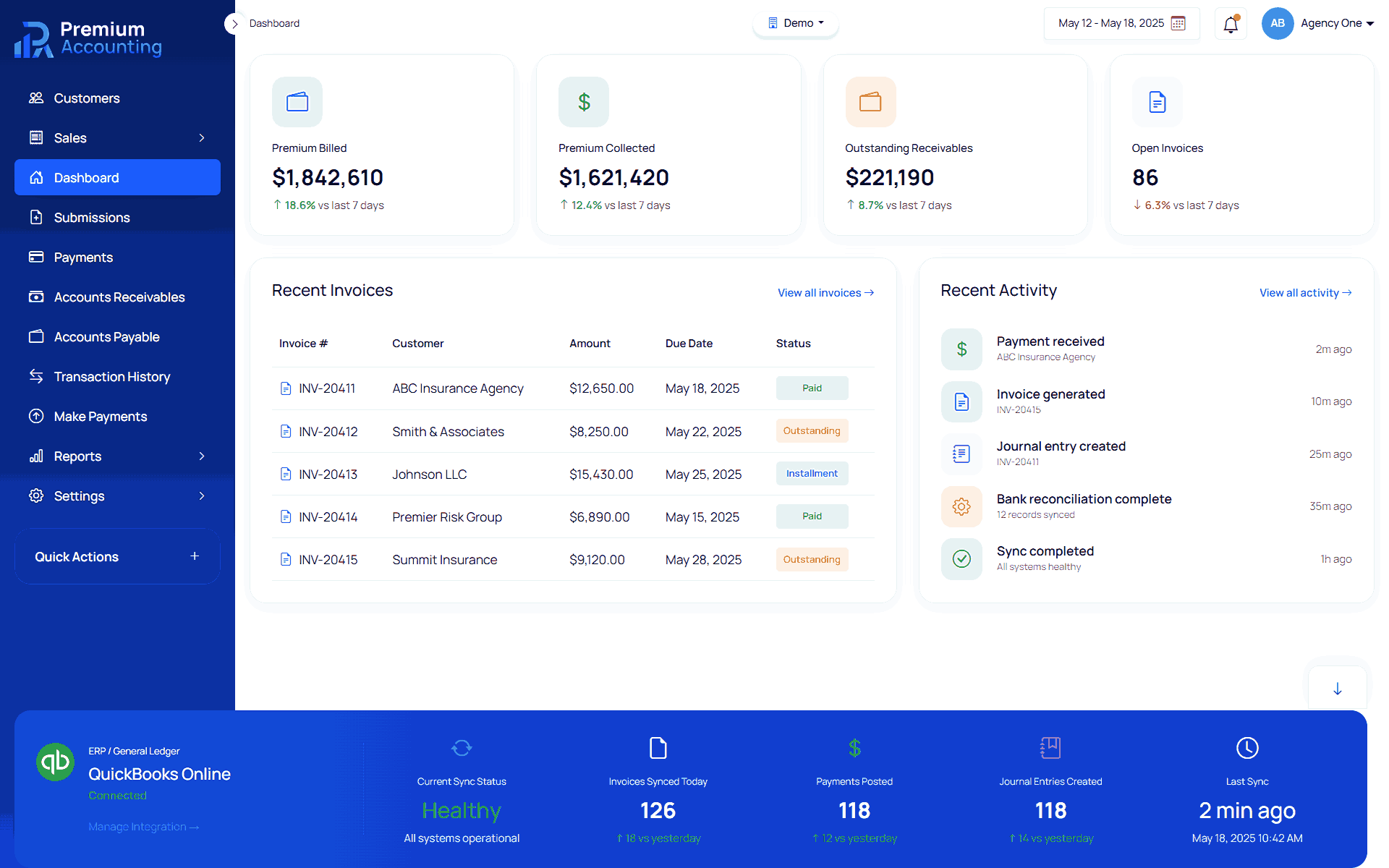
QuickBooks Online is one of the most popular accounting platforms used by insurance agencies, MGAs and wholesalers. While QuickBooks is an excellent general ledger and financial reporting system, it was never designed to manage policy transactions, premium accounting, commissions, insurance invoices or policy level accounting workflows. RemoteBooksOnline helps insurance organizations integrate Premium Accounting with QuickBooks Online, allowing Premium Accounting to become the insurance accounting subledger while QuickBooks continues serving as the financial system of record. This architecture gives finance teams the best of both worlds: purpose-built insurance accounting combined with industry-leading financial reporting. Learn more about Enterprise Insurance Accounting Outsourcing.
Why QuickBooks Alone Is Not Enough
QuickBooks Online excels at:
- General Ledger
- Accounts Receivable
- Accounts Payable
- Bank Reconciliation
- Financial Statements
- Cash Flow
- Budgeting
However, insurance organizations also need to manage:
- Policy Numbers
- Policy Transactions
- Premium Accounting
- Policy Line Items
- Agency Commissions
- MGA Commissions
- Insurance Invoices
- Trust Accounting
- Carrier Relationships
- Policy Reporting
These workflows are outside the scope of traditional accounting software. Premium Accounting fills this gap. Learn more about Insurance Accounting Services, Insurance Accounting Platform Implementation.
Premium Accounting + QuickBooks Architecture
Instead of replacing QuickBooks, Premium Accounting extends it.
Premium Accounting Manages
- Policy Accounting
- Premium Accounting
- Policy Transactions
- Premium Line Items
- Commission Accounting
- Insurance Invoices
- Insurance Reporting
- Trust Accounting
Synchronizes Accounting Activity
QuickBooks Online Manages
- General Ledger
- Financial Statements
- Accounts Receivable
- Accounts Payable
- Banking
- Financial Reporting
- Corporate Accounting
This architecture eliminates duplicate data entry while maintaining complete insurance accounting visibility. Learn more about PremiumAccounting.ai and how it extends QuickBooks Online with insurance-specific accounting.
What Synchronizes to QuickBooks?
Depending on implementation requirements, Premium Accounting can synchronize:
 Journal Entries
- Accounts Receivable
- Accounts Payable
- Premium Transactions
- Accounting Balances
- Financial Posting
- Customer Accounting Activity
This allows finance teams to continue using QuickBooks without sacrificing insurance accounting functionality. Learn more about Insurance General Ledger Integration.
Insurance Accounting Workflow with QuickBooks
Create Policy
Policy information is entered into Premium Accounting. Learn more about Policy Submission Accounting.
Enter Premium Line Items
Premiums, taxes and fees are entered. Learn more about Policy Line Item Accounting.
Calculate Commissions
Agency and MGA commissions calculate automatically. Learn more about Insurance Commission Accounting.
Generate Invoice
Insurance invoices are generated from policy information. Learn more about Insurance Invoice Management.
Validate Accounting
Review:
- Premium
- Commissions
- Accounting Totals
- Financial Reports
Synchronize to QuickBooks
Accounting transactions synchronize into QuickBooks Online.
Modernize Your Insurance Accounting Operations
Learn how RemoteBooksOnline can help implement Premium Accounting, streamline premium accounting workflows, and support your accounting team with ongoing insurance accounting services.
Schedule an Insurance Accounting ConsultationLearn About Premium Accounting
Benefits of QuickBooks + Premium Accounting
Organizations gain:
- Insurance-specific accounting
- Automated commission calculations
- Policy accounting
- Premium accounting
- Better reporting
- Reduced spreadsheets
- Faster reconciliations
- Better month-end close
- Improved controller visibility
- Better audit readiness
Built for Insurance Organizations
Why RemoteBooksOnline
RemoteBooksOnline combines insurance accounting expertise with QuickBooks implementation experience.
We help organizations:
- Implement Premium Accounting
- Integrate with QuickBooks
- Configure Chart of Accounts
- Configure Accounting Rules
- Train Users
- Validate Financial Data
- Support Ongoing Accounting Operations
Unlike software implementation firms, our accounting professionals continue supporting your finance team after implementation. Learn more about Insurance Accounting Implementation Services.
Ready to Modernize Your Insurance Accounting?
Whether you're evaluating Premium Accounting, replacing manual spreadsheets, improving reconciliations, or looking for ongoing insurance accounting support, our specialists are ready to help.
Schedule an Insurance Accounting ConsultationBrowse Insurance Accounting Resources

Remote Books Online is an
for






Insurance Native
Financial Workflows

End-to-End
Implementation

Training & Ongoing
Support

Accurate, Compliant &
Audit-Ready
Frequently Asked Questions
No. Premium Accounting complements QuickBooks by providing insurance-specific accounting while QuickBooks remains the general ledger.
QuickBooks was designed for financial accounting, not insurance operations such as policy accounting, premium line items, commissions and policy transactions.
Organizations typically synchronize: journal entries, accounts receivable, accounts payable, premium transactions, financial balances.
Yes. Agency and MGA commissions are automatically calculated before accounting transactions synchronize with QuickBooks.
Yes. QuickBooks continues managing financial reporting while Premium Accounting manages insurance operations.
Yes. We configure Premium Accounting, QuickBooks integration, accounting mapping, testing and ongoing accounting support.
Absolutely. Many organizations continue using QuickBooks while adding Premium Accounting as their insurance accounting subledger.
Disclaimer: All trademarks, product names, company names, logos, and registered marks mentioned on this website are the property of their respective owners.
The information presented is based on publicly available sources, including official product documentation, vendor websites, marketing materials, and generally available industry information at the time of publication. Product features, capabilities, pricing, integrations, and specifications may change without notice.
This content is provided for informational and educational purposes only and does not imply any endorsement, partnership, sponsorship, affiliation, or certification by any referenced company or product. Readers should verify current product information, features, pricing, and implementation requirements directly with the respective vendor before making purchasing or implementation decisions.
If you believe any factual information on this page is inaccurate or outdated, please contact us. We will review the information and update it as appropriate.