Insurance Line of Business Management
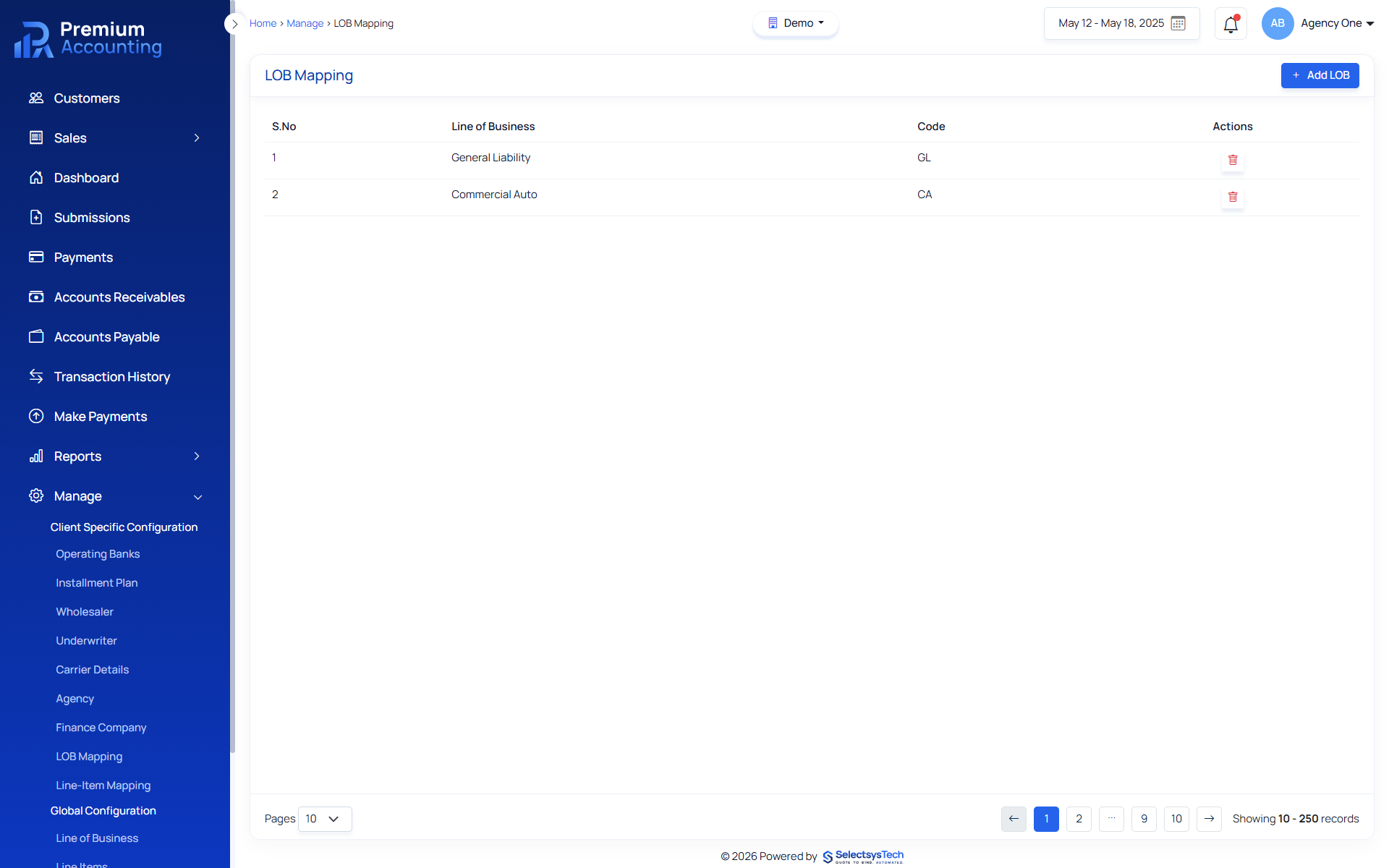
Every insurance policy belongs to one or more Lines of Business (LOBs). Whether the policy is General Liability, Workers Compensation, Property, Commercial Auto or Cyber Liability, the Line of Business determines how policies, premiums, reporting and accounting are organized. RemoteBooksOnline helps insurance organizations configure and manage Lines of Business using Premium Accounting. Instead of manually maintaining inconsistent coverage names across policies, organizations can centralize Line of Business configuration while improving reporting, accounting accuracy and operational consistency. Premium Accounting integrates with QBO, Xero, Workday and Sage while maintaining insurance-specific Line of Business management. Learn more about Enterprise Insurance Accounting Outsourcing.
What Is Line of Business (LOB) Management?
Line of Business Management is the process of configuring and maintaining the insurance coverage types used throughout an organization's accounting and policy workflows. Every policy line item references a Line of Business.
Examples include:
 General Liability
- Workers Compensation
- Commercial Property
- Business Owners Policy
- Commercial Auto
- Inland Marine
- Cyber Liability
- Professional Liability
- Umbrella
- Excess Liability
- Builders Risk
- EPLI
These standardized values improve policy accounting, reporting and financial analysis. Learn more about Insurance Accounting, Policy Line Item Accounting
Why Line of Business Management Matters
Many insurance organizations allow users to manually enter coverage descriptions.
This often creates:
- Duplicate coverage names
- Misspelled LOBs
- Reporting inconsistencies
- Incorrect premium reporting
- Poor financial visibility
- Difficult reconciliations
Premium Accounting solves this by allowing administrators to centrally manage approved Lines of Business. Every accounting workflow references the same standardized LOB records.
Inside Premium Accounting
Premium Accounting includes a dedicated LOB Mapping module.
Administrators can:
- Create New Lines of Business
- Search Existing LOBs
- Delete Unused LOBs
- Maintain Coverage Definitions
Configured LOBs automatically populate the Coverage dropdown during Policy Line Item entry. This ensures every policy references approved coverage types. Learn more about Policy Line Item Accounting, Insurance Master Data Management
How LOB Management Supports Insurance Accounting
Every Line of Business influences downstream accounting.
LOBs support:
- Premium Accounting
- Policy Reporting
- Commission Reporting
- Financial Reporting
- Executive Reporting
- Premium Analysis
- Carrier Reporting
- Agency Reporting
Because every policy references a valid LOB, reporting becomes significantly more reliable.
LOB Configuration Workflow
Open LOB Management
Navigate to:
- Manage
- LOB Mapping
Create New Line of Business
Examples:
- General Liability
- Workers Compensation
- Property
Save LOB
The new coverage becomes available throughout Premium Accounting.
Select During Policy Entry
Accounting users select the configured LOB while entering Premium Line Items.
Learn more about Policy Line Item Accounting
Generate Reports
Financial and operational reports can now group information consistently by Line of Business.
Learn more about Insurance Financial Reporting
Benefits of Centralized LOB Management
Organizations improve:
- Reporting Consistency
- Accounting Accuracy
- Premium Analysis
- Carrier Reporting
- Agency Reporting
- Executive Dashboards
- Financial Visibility
- Operational Standardization
Modernize Your Insurance Accounting Operations
Learn how RemoteBooksOnline can help implement Premium Accounting, streamline premium accounting workflows, and support your accounting team with ongoing insurance accounting services.
Schedule an Insurance Accounting ConsultationLearn About Premium Accounting
LOB Reporting Examples
Controllers and executives may analyze:
- Premium by Line of Business
- Commission by Line of Business
- Revenue by Line of Business
- Policies by Line of Business
- Renewals by Line of Business
- Carrier Production by Line of Business
- Agency Production by Line of Business
- Financial Performance by Line of Business
These reports become significantly more valuable when every policy references standardized LOB values.
Relationship to Policy Line Item Accounting
Every Premium Line Item references a Line of Business.
This allows accounting teams to:
- Group Premium
- Analyze Revenue
- Compare Performance
- Produce Financial Reports
Learn more about Policy Line Item Accounting
Relationship to Financial Reporting
Financial reporting becomes more meaningful when organizations can segment results by:
- Coverage
- Product
- Line of Business
Premium Accounting provides this capability through centralized LOB management.Learn more about Insurance Financial Reporting
Relationship to General Ledger
Premium Accounting manages insurance-specific LOB information while synchronized accounting transactions flow into:
This allows organizations to maintain insurance-specific operational reporting without changing ERP financial reporting. Learn more about Insurance General Ledger Integration
How RemoteBooksOnline Helps
RemoteBooksOnline helps organizations:
- Design LOB Standards
- Configure Coverage Types
- Standardize Reporting
- Configure Premium Accounting
- Implement Premium Accounting
- Train Users
- Maintain Accounting Operations
Unlike software vendors, we help organizations build reporting structures that continue supporting finance teams long after implementation. Learn more about Insurance Accounting Implementation
Ready to Modernize Your Insurance Accounting?
Whether you're evaluating Premium Accounting, replacing manual spreadsheets, improving reconciliations, or looking for ongoing insurance accounting support, our specialists are ready to help.
Schedule an Insurance Accounting ConsultationBrowse Insurance Accounting Resources

Remote Books Online is an
for






Insurance Native
Financial Workflows

End-to-End
Implementation

Training & Ongoing
Support

Accurate, Compliant &
Audit-Ready
Frequently Asked Questions
Line of Business management standardizes insurance coverage types used throughout policy accounting, premium accounting and reporting.
It allows organizations to consistently classify policies, premiums and financial activity while improving reporting accuracy.
Yes. Premium Accounting allows administrators to add, edit and manage approved coverage types.
Because every policy references standardized coverage values, organizations can produce consistent operational and financial reports.
Yes. Premium Accounting synchronizes accounting activity with: QBO, Xero, Workday Sage while maintaining insurance-specific LOB information.
Yes. We configure Line of Business standards during implementation and support ongoing accounting operations afterward.
Absolutely. Executives gain visibility into premium, commissions, revenue and profitability by Line of Business.