Insurance Invoice Management
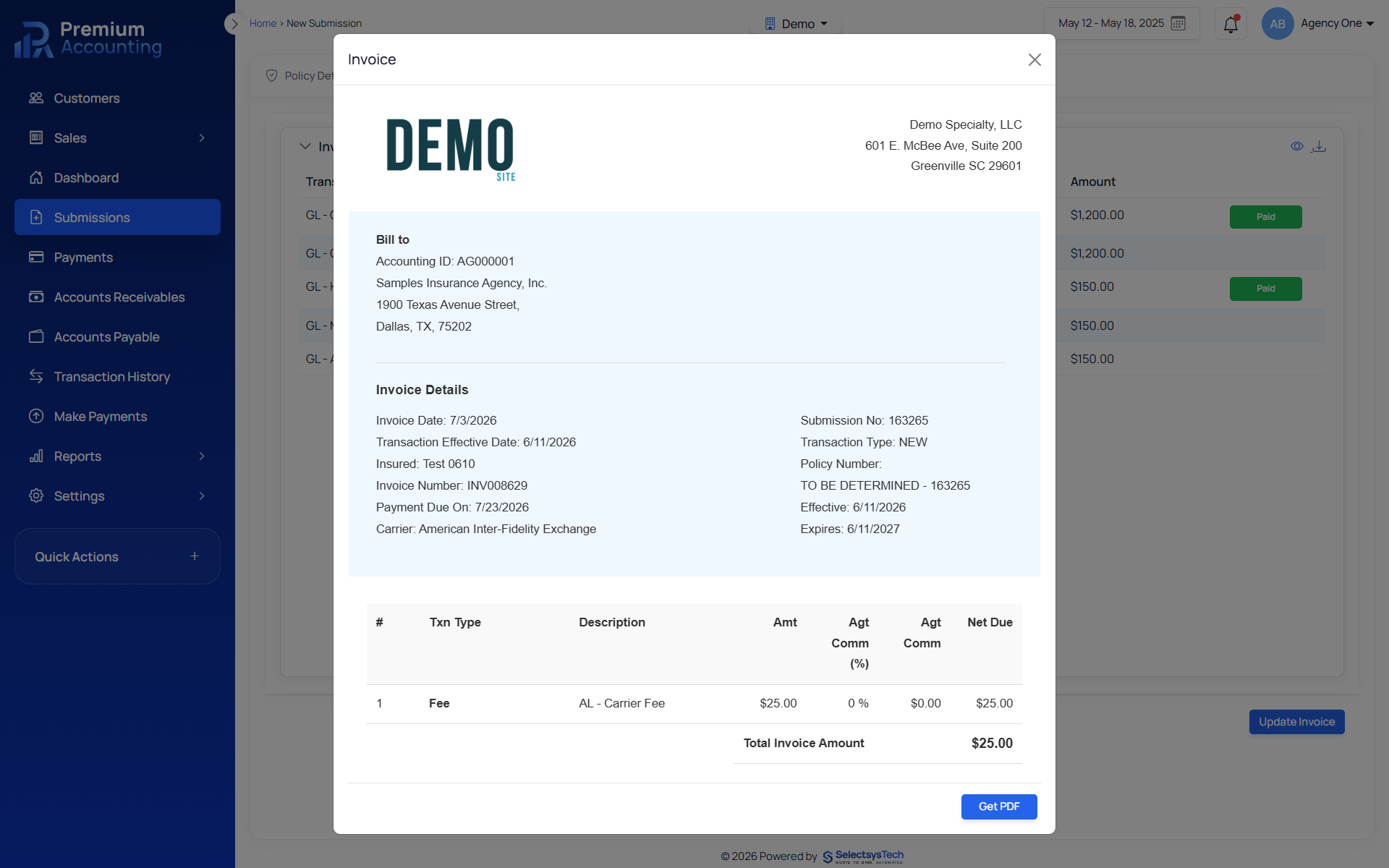
Invoice generation is one of the most important steps in insurance accounting. Every invoice must accurately reflect premiums, taxes, fees, commissions and policy activity before financial transactions are synchronized with the general ledger. RemoteBooksOnline helps insurance agencies, MGAs, wholesalers and carriers implement structured insurance invoice management using Premium Accounting. Rather than creating invoices manually or maintaining multiple versions of policy billing information, Premium Accounting generates invoices directly from policy details and policy line items while maintaining complete accounting traceability. Premium Accounting integrates with QBO, Xero, Workday and Sage, allowing invoice activity to flow into your existing financial reporting environment. Learn more about Enterprise Insurance Accounting Outsourcing.
What Is Insurance Invoice Management?
Insurance invoice management is the process of creating, updating, managing and tracking invoices generated from insurance policy transactions. Unlike standard invoicing systems, insurance invoices depend on policy activity.
Invoices may change because of:
 New Business
- Renewals
- Endorsements
- Cancellations
- Audits
- Additional Premium
- Return Premium
- Tax Changes
- Fee Changes
- Commission Adjustments
Insurance invoice management ensures every invoice accurately reflects the current policy accounting record. Learn more about Insurance Accounting, Insurance Premium Accounting
Why Insurance Invoices Are Different
Most accounting software creates invoices manually. Insurance accounting creates invoices from policy data.
Every invoice depends on:
- Policy Information
- Premium Line Items
- Taxes
- Fees
- Commission Rules
- Billing Type
- Policy Transaction
- Accounting Configuration
If any of these items change, the invoice should also change. Premium Accounting automatically supports this workflow.
Inside Premium Accounting
After Policy Details and Policy Line Items have been completed, users move to the Invoices tab.
The invoice workflow allows users to:
- Generate Invoice
- View Invoice
- Download PDF
- Update Existing Invoice
Rather than maintaining multiple invoice versions manually, Premium Accounting regenerates invoices using the latest policy information. Learn more about Policy Submission Accounting, Policy Line Item Accounting
Invoice Generation Workflow
Complete Policy Details
Policy information must be reviewed before invoices are generated.
Review Policy Line Items
Verify:
- Premium
- Taxes
- Fees
- Commission Amounts
Generate Invoice
Premium Accounting creates an invoice using:
- Policy Information
- Premium Line Items
- Billing Rules
- Accounting Configuration
The invoice becomes part of the accounting record.
Download PDF
Invoices can be downloaded for distribution or record retention.
Synchronize Accounting
Invoice activity becomes available for downstream accounting workflows and financial reporting.
Learn more about Insurance General Ledger Integration
Invoice Updates
Insurance policies frequently change after invoices have already been issued.
Changes may include:
- Endorsements
- Cancellations
- Renewals
- Premium Adjustments
- Additional Fees
- Corrected Policy Information
Premium Accounting allows users to return to:
- Policy Details
- Policy Line Items
Make the required changes and then simply select:
- Update Invoice
The invoice is regenerated using the latest accounting information. This eliminates duplicate invoices and reduces manual billing corrections.
Benefits of Automated Invoice Management
Organizations benefit from:
- Faster invoice generation
- Consistent invoice formatting
- Reduced manual billing
- Improved accounting accuracy
- Better commission calculations
- Better premium reconciliation
- Improved audit trails
- Reduced billing errors
- Faster customer service
Relationship to Premium Accounting
Invoices are generated directly from Premium Accounting.
Invoice values depend on:
- Policy Information
- Premium Line Items
- Taxes
- Fees
- Commission Calculations
Accurate invoice management begins with accurate policy accounting. Learn more about Insurance Premium Accounting, Commission Accounting
Relationship to Financial Reporting
Insurance invoices support:
- Accounts Receivable
- Premium Reporting
- Commission Reporting
- Financial Statements
- General Ledger Posting
Financial reporting depends on invoice accuracy. Learn more about Insurance Financial Reporting, Premium Reconciliation
General Ledger Integration
Organizations continue using their preferred ERP while Premium Accounting manages insurance billing workflows. Learn more about Insurance General Ledger Integration
How RemoteBooksOnline Helps
RemoteBooksOnline helps insurance organizations:
- Configure invoice workflows
- Configure billing rules
- Configure policy accounting
- Configure premium accounting
- Configure commission accounting
- Train accounting teams
- Implement Premium Accounting
- Support ongoing accounting operations
Unlike software vendors, we continue supporting accounting teams after implementation. Learn more about Insurance Accounting Implementation
Invoice Management by Organization

Remote Books Online is an
for






Insurance Native
Financial Workflows

End-to-End
Implementation

Training & Ongoing
Support

Accurate, Compliant &
Audit-Ready
Frequently Asked Questions
Insurance invoice management is the process of generating, updating and managing invoices that are created from insurance policy transactions.
Yes. Premium Accounting allows invoices to be regenerated after policy details or policy line items change.
Yes. Every invoice is generated directly from policy information and policy line items.
Yes. Premium Accounting supports integration with: QBO, Xero, Workday, Sage.
Yes. Generated invoices can be viewed and downloaded as PDF documents.
Yes. We configure invoice workflows, billing rules, accounting workflows and ongoing accounting operations.
Yes. Automated invoice generation reduces manual billing errors and improves premium accounting accuracy.